Abstract Liquid Patterns: Fluid Design Foundations for Print and Digital Media
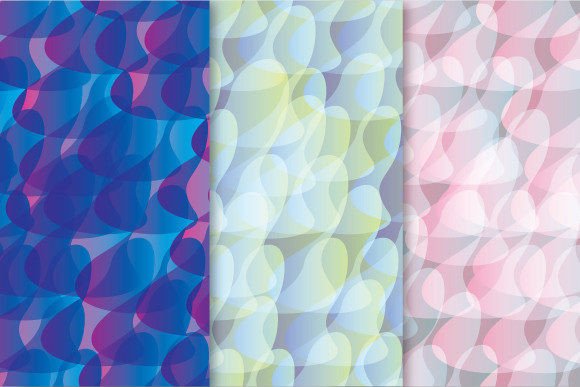
Abstract Liquid Patterns represent a distinctive category of vector-based visual motifs defined by organic flow, seamless continuity, and dynamic surface modulation. Unlike rigid geometric repeats or pixel-based textures, these patterns emulate the behavior of viscous fluids—think mercury pooling, ink dispersing in water, or molten glass cooling into undulating forms. Their defining trait is not randomness, but controlled fluidity: each curve, gradient transition, and interwoven contour is mathematically anchored to ensure perfect tiling across any dimension without visible seams or alignment artifacts.
How Seamless Repeating Vector Patterns Enable Precision at Scale
The seamlessness of Abstract Liquid Patterns isn’t incidental—it’s engineered. In vector formats like EPS 10, every pattern tile is constructed using Bézier paths with closed, non-overlapping paths and precisely mirrored anchor points along tile boundaries. This allows the design to repeat infinitely in both horizontal and vertical directions while preserving smooth continuity across edges. When rendered at 3600 × 3600 pixels (12 × 12 inches at 300 dpi), the JPEG output retains full fidelity because the underlying vector geometry scales losslessly before rasterization. No interpolation blur, no edge halos—just consistent, high-resolution surface coverage ideal for large-format printing, packaging substrates, or immersive digital backdrops.
Consider a textile designer developing a luxury scarf collection. A single Abstract Liquid Pattern—say, one evoking slow-motion oil swirls in iridescent pigment—can be applied across silk twill, cotton poplin, and wool crepe without recalibration. Because the EPS file preserves editable curves, color stops, and transparency layers, the designer adjusts hue saturation or stroke weight globally, and the change propagates uniformly across all repeated instances. That same file serves equally well as a background layer in a responsive web interface, where CSS background-repeat: repeat renders the pattern cleanly at any viewport size.
Real-World Applications Across Diverse Fields
Abstract Liquid Patterns transcend decorative function. Their adaptability makes them valuable infrastructure—not just assets—in multiple professional workflows:
- Brand Identity Systems: Companies seeking to convey innovation, adaptability, or intuitive technology often integrate liquid-inspired motifs into motion graphics, app interfaces, and environmental signage. A fintech startup might use a subtle, low-contrast Abstract Liquid Pattern as an animated loading overlay—its gentle morphing reinforces concepts of fluid data movement and responsive service.
- Educational Visualizations: Science educators leverage these patterns to model complex systems—viscous flow dynamics in physics labs, neural signal propagation in biology courses, or molecular diffusion in chemistry simulations. Because the patterns are built from scalable vectors, they remain legible when zoomed into microscopic detail during interactive whiteboard sessions.
- Architectural Surface Design: Interior designers specify Abstract Liquid Patterns for custom wallcoverings, acoustic panel facings, and ceramic tile layouts. The 300 dpi JPEG ensures crisp reproduction on matte-finish vinyl murals up to 10 feet tall; the EPS files allow contractors to adjust tile spacing to match grout lines or structural columns without distorting the motif’s kinetic rhythm.
- Product Packaging & Labeling: Beverage brands use liquid-patterned labels to evoke freshness, purity, or effervescence. A craft kombucha line may select a pattern with soft cyan-to-teal gradients and micro-bubble accents—rendered identically on 2 oz sample vials and 1-gallon growlers thanks to the resolution-agnostic EPS source.
Technical Specifications: Why File Format and Resolution Matter
The delivery package—a ZIP archive containing three EPS files and three corresponding JPEGs—is deliberately structured to support end-to-end production integrity. Each EPS 10 file complies with Adobe Illustrator CC 2019+ standards, embedding CMYK and RGB color profiles, supporting transparency, and retaining editable text elements (where applicable). EPS 10 also guarantees backward compatibility with legacy RIP (raster image processor) systems used in commercial print shops—critical for consistent spot-color matching in foil-stamped luxury packaging.
The JPEG counterparts are not downscaled previews. They are full-resolution, sRGB-encoded exports—3600 × 3600 pixels, exactly 12 × 12 inches at 300 dpi—optimized for immediate use in editorial layouts, e-commerce product mockups, or client presentations. Unlike compressed web JPEGs, these files use minimal chroma subsampling and zero quality degradation, preserving subtle luminance gradients essential to liquid aesthetics (e.g., the delicate shift from translucent amber to deep burnt sienna in a honeycomb-melt pattern).
This dual-format approach eliminates common workflow friction. A marketing manager can drop the JPEG directly into a Shopify banner without waiting for asset conversion. Meanwhile, the production team uses the EPS to generate die-cut templates for embossed business cards—scaling the pattern to fit a 3.5 × 2 inch canvas while maintaining vector sharpness at every curve endpoint.
User-Centric Considerations for Implementation
While Abstract Liquid Patterns offer significant flexibility, effective integration depends on contextual awareness—not just technical capability. Here’s what practitioners should weigh:
Color Mode Alignment
Always verify whether your final output requires CMYK (offset printing, branded merchandise) or RGB (digital screens, projections). EPS files embed both profiles, but JPEG exports default to sRGB. For Pantone-critical applications—like corporate stationery—the EPS should be opened in Illustrator, converted to the appropriate spot-color library, and saved as a new EPS with embedded swatches.
Scale Sensitivity
Liquid patterns behave differently across sizes. A motif designed for wallpaper may appear overly dense at thumbnail scale in a mobile UI. Test at intended display dimensions: zoom a JPEG to 100% view in Photoshop and assess legibility of fine transitions. If micro-details vanish, simplify path complexity in the EPS using Illustrator’s “Simplify” tool—reducing anchor points while preserving curvature integrity.
Cultural and Cognitive Resonance
Fluid forms carry implicit associations: calm (slow ripples), instability (turbulent eddies), or transformation (phase shifts). A healthcare app using a churning, high-contrast liquid pattern may unintentionally evoke anxiety rather than healing. Conversely, a meditation platform benefits from slow, expansive waveforms with soft value transitions. User testing—even informal feedback from diverse stakeholders—helps calibrate emotional resonance.
Workflow Integration: From Concept to Output
Abstract Liquid Patterns integrate most effectively when treated as modular components—not static images. Designers using Figma or Adobe XD can import EPS files as SVG assets, then apply them as fill layers within auto-layout frames. This enables real-time resizing: stretch a card component, and the pattern rescales seamlessly without manual tiling adjustments.
In print production, prepress teams use the EPS files to generate trapping outlines and overprint settings. Because liquid patterns often feature overlapping transparent shapes, enabling overprint for dark foreground elements prevents unintended white gaps where colors intersect—especially critical for metallic inks on uncoated stock.
For developers building generative art tools or interactive installations, the mathematical predictability of these patterns matters most. The consistent tile dimensions (e.g., 3600 px × 3600 px) and vector precision allow for reliable coordinate mapping. A Unity developer creating an AR mural experience can anchor pattern UV coordinates to physical wall markers, ensuring the liquid flow appears anchored to real-world geometry—not drifting with device movement.
Emerging Trends and Future-Proofing
As computational design matures, Abstract Liquid Patterns are evolving beyond static repetition. New implementations combine them with procedural noise algorithms to create “adaptive tiling”—patterns that subtly vary density or hue based on input data (e.g., live air quality metrics shifting a city map’s background from cerulean flow to smog-gray turbulence). While the current ZIP package delivers deterministic, production-ready assets, its clean vector foundation makes it compatible with such enhancements: EPS paths can be imported into Python libraries like svgpathtools or JavaScript frameworks like Two.js for runtime manipulation.
Accessibility is another growing priority. Designers now evaluate liquid patterns for sufficient contrast between adjacent tonal zones—ensuring users with color vision deficiencies perceive depth and motion cues. Tools like Stark or Colorable validate luminance contrast ratios against WCAG 2.1 guidelines, confirming that even the softest gradient transitions meet minimum 3:1 contrast for non-text elements.
Ultimately, Abstract Liquid Patterns succeed not because they’re visually striking—though many are—but because they merge aesthetic intention with engineering rigor. They bridge disciplines: the illustrator’s intuition, the engineer’s precision, the educator’s clarity, and the developer’s scalability. Whether printed on archival paper or streamed across a global CDN, their seamless logic holds. And in an era where audiences increasingly discern authenticity from artifice, that consistency—rooted in measurable, repeatable structure—is what makes them enduringly useful.