Patterns Persimmon Digital Paper: Seamless, Versatile, and Ready for Real Creative Work
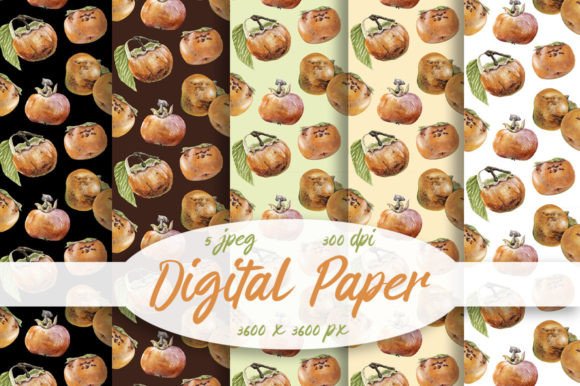
If you've ever spent hours trying to tile a background without visible seams—or worse, watched your design fall apart when scaled up—you’ll appreciate what Patterns Persimmon Digital Paper delivers: five high-resolution, truly seamless digital papers designed to behave like physical stationery, but with the flexibility of digital files. Each pattern is crafted in crisp 3600×3600 pixels at 300dpi—meaning they hold up beautifully whether printed on greeting cards, used as web backgrounds, or layered into digital scrapbooking layouts.
Where These Patterns Fit Into Everyday Creative Work
This isn’t just another set of decorative tiles—it’s a quietly powerful tool that shows up where you least expect it to make a real difference. Consider these everyday situations:
- Small business owners designing custom packaging inserts or branded thank-you notes—using one of the Patterns Persimmon Digital Paper designs adds instant warmth and cohesion without needing a graphic designer on retainer.
- Teachers and educators creating printable worksheets, flashcards, or classroom banners—these papers add visual interest while keeping text legible and professional.
- Wedding planners and DIY couples building invitations, menus, or signage templates—seamless patterns mean no awkward repeats across large-format prints (like 12×18 inch programs), and the persimmon-inspired palette feels both modern and timeless.
- Digital scrapbookers and bullet journal enthusiasts who layer textures behind photos or handwritten notes—these JPEGs drop in cleanly in apps like Procreate, Canva, or Adobe Photoshop without distortion or pixelation.
Why “Seamless” Actually Matters—Beyond the Buzzword
A truly seamless pattern doesn’t just look smooth when tiled—it behaves predictably across tools and outputs. With Patterns Persimmon Digital Paper, the repeat is mathematically balanced: edges align precisely, so when you duplicate the image horizontally or vertically in your editing software, there’s no ghost line, no color shift, no “glitch” where tiles meet. That reliability saves time—and avoids last-minute panic before a client deadline or print run.
This matters especially if you’re working across platforms. For example, a Canva user might upload one of these papers as a background for a social media post, then later reuse the same file in Illustrator to build a business card layout. Because each JPEG is square, high-res, and built for repetition, it adapts without extra cropping or resampling.
Who Gets the Most Out of This Set—and How They Use It Differently
The beauty of Patterns Persimmon Digital Paper is how differently people apply it—not because the files change, but because creative needs do.
A stationery designer might use one pattern as a subtle watermark under hand-lettered quotes—its low-contrast texture keeps focus on the words while adding tactile depth. Meanwhile, a print-on-demand artist could scale the same file to cover an entire tote bag design, knowing the repeat stays clean even at 24 inches wide.
For interior designers mocking up mood boards or fabric concepts, these papers offer quick, realistic surface textures—think wrapping paper mockups, wallpaper swatches, or even faux leather or linen effects for furniture renders. And since the color palette leans into warm terracottas, muted oranges, and soft clay tones, they pair effortlessly with natural materials like wood, stone, or woven textiles.
What to Keep in Mind Before You Start Using Them
While these files are ready to go, a few practical considerations help you get the most out of them:
- Monitor calibration affects perception: The note about colors possibly varying across screens isn’t boilerplate—it’s real. If you’re matching to a specific brand color or planning a multi-piece print project (e.g., matching invitation envelopes to a digital background), preview your final output on the device or printer you’ll actually use. Soft-proofing in Photoshop or checking a test print goes a long way.
- JPEG format means no transparency: These are flat, white-background JPEGs—not PNGs with alpha channels. That makes them ideal for print and simple overlays, but if you need to place them over non-white layers with blending modes (like Multiply or Overlay), you may want to convert to PNG first or adjust blending in your editor.
- They’re not vector-based: While 3600×3600 at 300dpi covers most common uses—including A4, letter, and 12×12 inch craft projects—they won’t infinitely scale like SVGs. For massive wall murals or billboard-sized applications, check your output resolution requirements first.
Strengths That Stand Up in Real Projects
What sets Patterns Persimmon Digital Paper apart isn’t just resolution or seamlessness—it’s intentionality. The five included patterns vary in density and rhythm: some lean minimalist with quiet, spaced motifs; others offer gentle movement with overlapping organic shapes. That variety means you’re not stuck choosing between “too busy” and “too plain.” You can match tone to purpose—calm for wellness branding, rhythmic for lifestyle blogs, grounded for artisan food packaging.
Also worth noting: these aren’t generic stock textures. The persimmon-inspired palette avoids trend-driven saturation—it’s warm without being cloying, earthy without feeling dated. That gives your work longevity, whether you’re designing assets for a seasonal campaign or building a brand identity meant to last years.
When This Might Not Be the Right Fit
That said, it’s okay to recognize limits. If you need editable vectors, animated patterns, or files with licensed commercial rights for resale *as-is* (e.g., selling the pattern itself on Etsy), this set isn’t built for that. It’s designed for integration—not redistribution. Likewise, if your workflow relies heavily on procedural textures (like Substance Designer outputs) or parametric repeats (where you tweak scale, contrast, or hue on the fly), these static JPEGs won’t offer that level of control.
But for the vast majority of makers—those stitching together invitations, prepping print-ready files, building cohesive social feeds, or adding quiet sophistication to digital presentations—Patterns Persimmon Digital Paper lands right in the sweet spot: professional-grade quality, zero setup friction, and quiet versatility that works behind the scenes so your ideas take center stage.